
Quick Pick in APEX Report
I have an Interactive Report that includes some editable columns, and the users wanted to include some “quick picks” on these columns to make it easy to copy data from a previous period. The user can choose to type in a new value, or click the “quick pick” to quickly data-enter the suggested value.
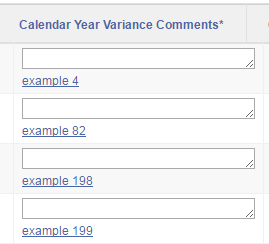
Normally, a simple page item can have a quick pick by setting the Show Quick Picks attribute on the item. This is not, however, available as an option when generating APEX items in a report.
To do this, I added code like the following to my report query: NOTE: don’t copy this, refer to ADDENDUM below
SELECT ...
      ,APEX_ITEM.textarea(5,x.ytd_comments
         ,p_rows => 1
         ,p_cols => 30
         ,p_item_id => 'f05_'||to_char(rownum,'fm00000'))
       || case when x.prev_ytd_comments is not null
          then '<a href="javascript:$(''#'
            || 'f05_' || to_char(rownum,'fm00000')
            || ''').val('
            || apex_escape.js_literal(x.prev_ytd_comments)
            || ').trigger(''change'')">'
            || apex_escape.html(x.prev_ytd_comments)
            || '</a>'
          end
       as edit_ytd_comments
FROM my_report_view x;
This results in the following HTML code being generated:
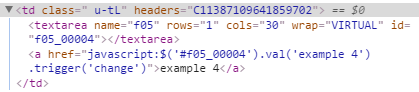
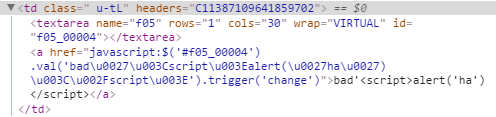
In the report definition, the EDIT_YTD_COMMENTS column has Escape Special Characters set to No. This runs a real risk of adding a XSS attack vector to your application, so be very careful to escape any user-entered data (such as prev_ytd_comments in the example above) before allowing it to be included. In this case, the user-entered data is rendered as the link text (so is escaped using APEX_ESCAPE.html) and also within some javascript (so is escaped using APEX_ESCAPE.js_literal).
So, if the data includes any characters that conflict with html or javascript, it is neatly escaped:
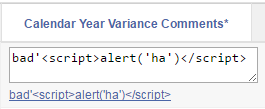
And it is shown on screen as expected, and clicking the link copies the data correctly into the item:
This technique should, of course, work with most of the different item types you can generate with APEX_ITEM.
Recommended further reading:
ADDENDUM 6/2/2017
A problem with the above code causes this to fail in Internet Explorer (IE11, at least) – when clicking on the quickpick, the user is presented with a page blank except for “[object Object]”. After googling I found this question on StackOverflow and fixed the problem by moving the jQuery code to a function defined at the page level.
I added this to the page Function and Global Variable Declaration:
function qp (id,v) {
  $(id).val(v).trigger('change');
}
And modified the report query as follows:
SELECT ...
      ,APEX_ITEM.textarea(5,x.ytd_comments
         ,p_rows => 1
         ,p_cols => 30
         ,p_item_id => 'f05_'||to_char(rownum,'fm00000'))
       || case when x.prev_ytd_comments is not null
          then '<a href="javascript:qp(''#'
            || 'f05_' || to_char(rownum,'fm00000')
            || ''','
            || apex_escape.js_literal(x.prev_ytd_comments)
            || ')">'
            || apex_escape.html(x.prev_ytd_comments)
            || '</a>'
          end
       as edit_ytd_comments
FROM my_report_view x;

About Jeffrey Kemp
Application Designer & Developer at Oracle specialising in Oracle APEX (Application Express), Oracle SQL and PL/SQL. Oracle ACE Alumni ♠️. Piano player, father, husband, Christian. The views expressed on this blog are my own and do not necessarily reflect the views of Oracle.