
Select All / Unselect All Checkbox in Interactive Report Header
I want a checkbox in an Interactive Report (IR), and I want the users to be able to quickly Select All or Unselect All of them (but only for rows that were rendered on the page). I don’t want two big clunky buttons to do this, I just want a single checkbox in the header like I see on cool peoples’ web sites.
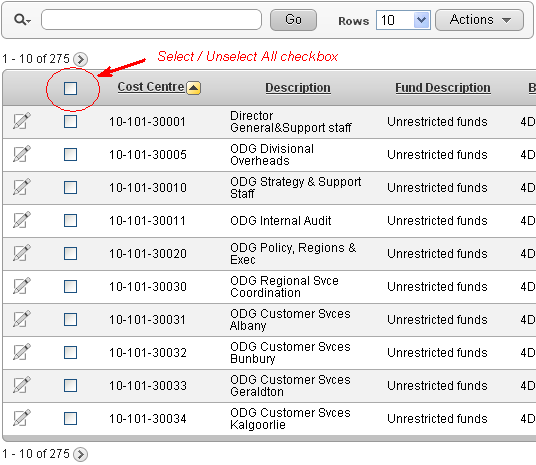
To do this:
1. In the Region Definition for the IR, add the checkbox to the query, e.g.:
SELECT ...,
       apex_item.checkbox(1, record_id) selected
FROM   ...
Also, set the region Static ID to some value, e.g. myreport This will be referred to by the dynamic action.
2. In the Report Attributes for the IR, modify the attributes of column “SELECTED”:
Heading =
<input type="checkbox" id="selectunselectall">
Escape Special Characters = No
Enable Users To = (uncheck all options, including Hide, Sort, etc.)
3. In the page definition, add a Dynamic Action:
Event = Change
Selection Type = jQuery Selector
jQuery Selector = #selectunselectall
Event Scope = Dynamic
Static Container (jQuery Selector) = #myreport
True Action = Execute JavaScript Code
Fire On Page Load = (uncheck)
Code =
if ($('#myreport #selectunselectall' ).is(':checked') ) {
  $('#myreport input[type=checkbox][name=f01]').prop('checked',true);
} else {
  $('#myreport input[type=checkbox][name=f01]').prop('checked',false);
}
The only issue with this is if the user clicks “Action” and “Select Columns”, the checkbox item shows the html code (”
UPDATE 18/5/2017: updated for multiple IRs on same page (APEX 5+)
UPDATE 23/5/2017: updated to recommended prop instead of attr

About Jeffrey Kemp
Application Designer & Developer at Oracle specialising in Oracle APEX (Application Express), Oracle SQL and PL/SQL. Oracle ACE Alumni ♠️. Piano player, father, husband, Christian. The views expressed on this blog are my own and do not necessarily reflect the views of Oracle.